
How to Download Instagram Videos, Reels, Photos and Stories
Saving publicly available Instagram content does not have to involve complicated software or lengthy setup. Our online Instagram downloader lets you process videos, Reels, photos, carousel posts, and active Stories directly through your browser. IGsty is a fast and easy Instagram downloader that lets you save public Reels, videos, photos, Stories, and IGTV content in high quality for free.
The process involves copying the Instagram content URL, pasting it into the downloader, and saving the available media to your device. You do not need to install an additional application or provide your Instagram password. Learn how to Download Instagram videos, Reels, photos, carousel posts, and public Stories online using a link on mobile or desktop quickly and safely today.
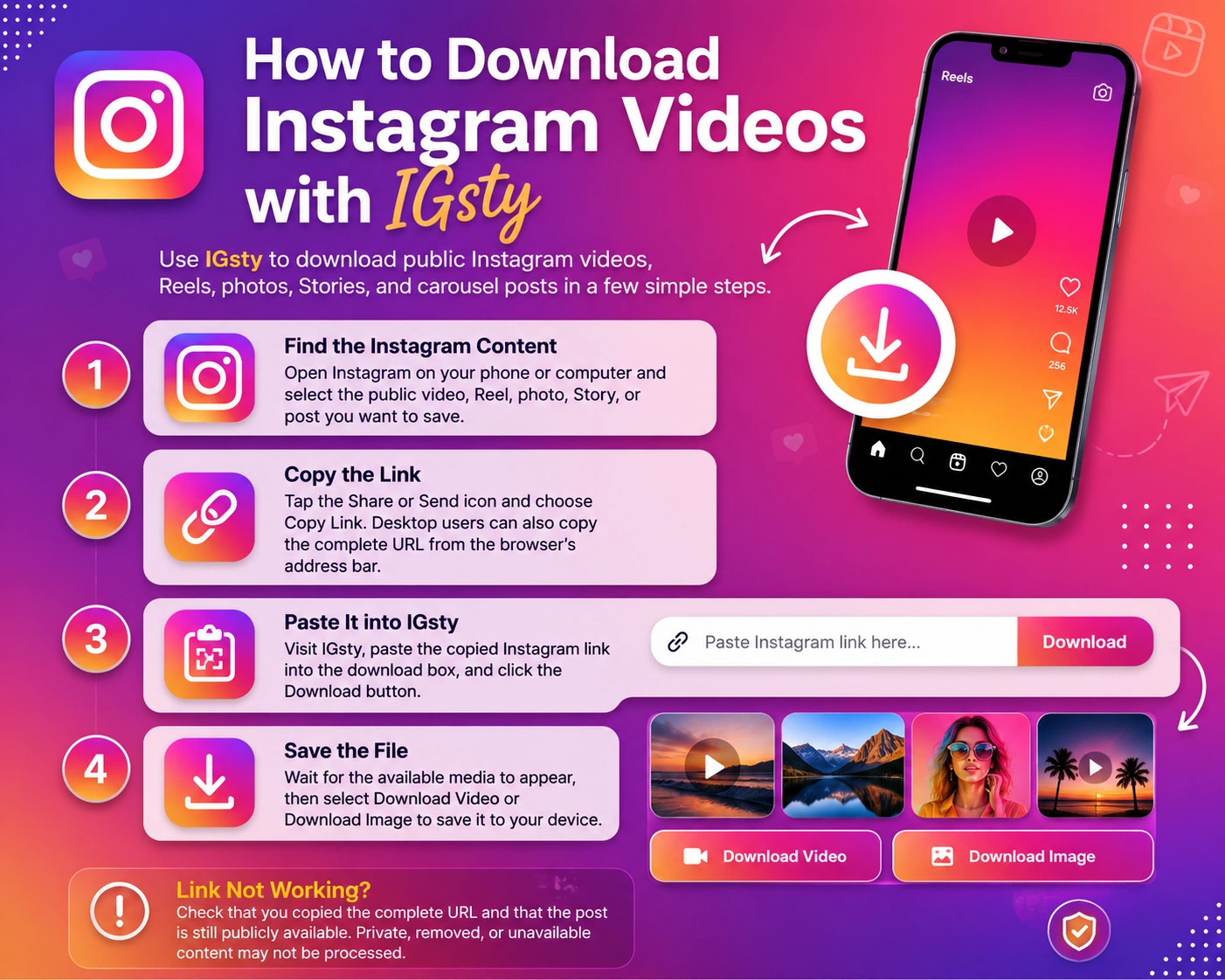
Download Instagram videos/Content in Three Simple Steps
Learn how to Download Instagram videos, Reels, photos, carousel posts, and Stories online using a link on mobile or desktop. Paste the Instagram post link, let the tool process it, and choose the media you want to save in just a few moments.
No app installation or account login is required to download publicly accessible Instagram content quickly and easily.
Find and Copy the Instagram URL
Open Instagram through its mobile app or website and locate the content you want to save.
Depending on your device and Instagram interface, use one of the following methods:
On Android or iPhone: Open the post or Reel, tap the Share or Send icon, and select Copy Link.
On a computer: Open the Instagram post in your browser and copy the complete URL from the address bar.
For a Story: Open the active Story, access its sharing options, and copy the available link.
Instagram’s official instructions currently place the Copy Link option inside the Share or Send menu for posts and Reels, although button placement may vary between app versions.
A valid Instagram URL may resemble one of these examples: Copy the entire address. Missing characters, spaces, or an incomplete URL can prevent the downloader from finding the media.
Paste the Address into the Download Field
Select the Media and Save It
Check the preview or thumbnail.
Click the Download button for the desired file.
Download Instagram videos or each item separately for carousel posts.
Save the file to your device or Downloads folder.
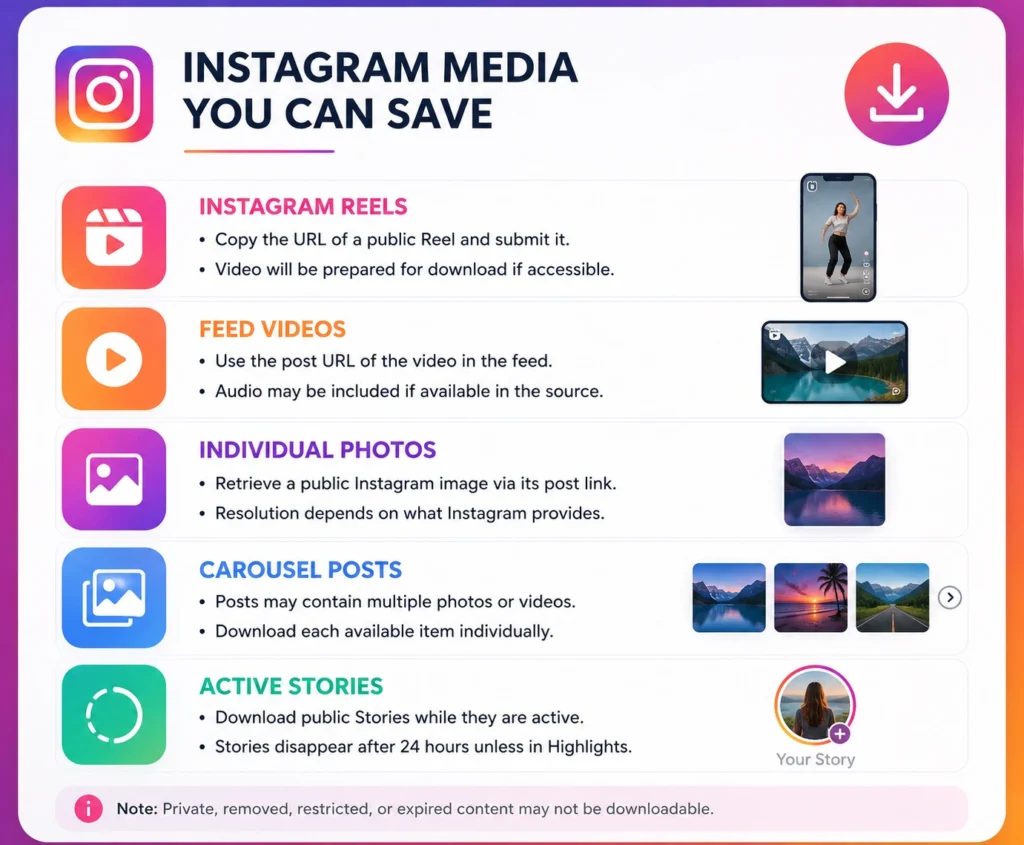
Instagram Media You Can Save
The downloader is designed to work with several common types of publicly accessible Instagram content By IGsty.
Copy the URL of a public Reel and submit it to the downloader. When the media is accessible, the tool prepares the video file for saving. This option is useful for preserving your own Reels, keeping authorised reference material, or viewing permitted content offline.
Standard video posts published in the Instagram feed can be processed through their post URLs. If the original post contains playable audio, the downloadable file may include that audio when it is available in the source.
A public Instagram image can be retrieved through its post link. The available resolution depends on the media Instagram provides for that URL, so the downloaded image may not always match the creator’s original camera file.
Instagram posts can contain a collection of photos, videos, or both. After processing a carousel link, the results page may show each available item individually, allowing you to download selected slides instead of the entire collection.
Public Stories may be downloadable while they remain active and accessible. Instagram states that regular Stories disappear from the profile, Feed, and Direct after 24 hours unless the creator adds them to Highlights. An expired, removed, private, or restricted Story may therefore return an error.
Use the Downloader on Mobile or Desktop
Because the downloader works inside a web browser, the basic process is similar across devices.
Android Phones and Tablets:
iPhone and iPad:
Windows, macOS and Other Computers:
Why Some Instagram Links Cannot Be Processed
A link may look correct but still fail because the underlying content is unavailable to the downloader.
Common reasons include:
The Instagram account is private.
The post has been deleted or archived.
The Story has expired.
The creator changed the account’s privacy settings.
Instagram temporarily restricted access to the media.
The URL was copied incorrectly.
The link redirects to a profile rather than a specific post.
The content is limited by location, age, or another access setting.
Instagram is experiencing a temporary technical issue.
Instagram explains that posts from private accounts are visible only to approved followers. A web-based downloader cannot use your follower permissions to bypass those privacy controls.
Troubleshooting a Failed Download
Try the following checks before submitting the link again.
Confirm the Post Is Still Available
Open the copied URL in a separate browser tab. If Instagram displays an unavailable-content message, the downloader will not be able to retrieve it.
Copy the Full Link Again
Return to Instagram and use the official Copy Link option. Avoid copying shortened text, captions, usernames, profile links, or incomplete addresses.
Check the Account’s Visibility
The content should be publicly accessible without relying on access to a private account. Following a private account inside your personal Instagram session does not automatically make its media available to an external web tool.
Wait for the Story to Load
If you are downloading an active Story, allow it to open fully before copying its link. Stories removed by the creator or no longer active cannot normally be recovered through the old URL.
Refresh the Downloader
Reload the page and paste the link again. A temporary browser or network interruption may have stopped the first request.
Disable Conflicting Browser Features
Strict content blockers, Download Instagram videos,restrictions, pop-up controls, or security extensions can sometimes interfere with result buttons. Temporarily adjusting the relevant browser setting or testing another browser may resolve the problem.
Clear Outdated Browser Data
When the same error appears repeatedly for links that should work, clear the downloader website’s cached data and reload the page.
Benefits of a Browser-Based Instagram Downloader
A link-based downloader keeps the process straightforward because it runs on the web rather than through a separate mobile application.
Key advantages include:
No additional software installation
Compatibility with mobile phones, tablets, laptops, and desktops
Support for several Instagram media types in one place
No need to provide an Instagram password
Quick access through a standard browser
Individual file selection for supported carousel posts
No requirement to learn complicated technical steps
The downloader is intended to retrieve accessible media from a valid URL. It does not unlock private profiles, restore deleted posts, or recover expired content that is no longer publicly available.
Download and Reuse Content Responsibly
Being able to save a file does not automatically give you permission to republish, edit, sell, distribute, or use it commercially.
Download Instagram videos content that:
Instagram’s intellectual-property guidance states that users should not post material that violates another person’s copyright or trademark rights. Instagram also advises users to post content they created themselves or have the right to share.
When downloading someone else’s work, obtain permission where required, credit the original creator appropriately, and follow the laws that apply in your country.
Frequently Asked Questions
Final Thoughts:
Locate the public Instagram video, Reel, photo, carousel, or active Story you want to save. Copy its complete link, paste it into the Download Instagram videos field, and follow the displayed options to store the available media on your device.
Always review the content before downloading and use the saved file only in ways permitted by the creator, Instagram’s terms, and applicable law.