
IGsty Chrome Extension: Is It Available? How It Works
Have you ever found an Instagram Reel or video that you wanted to watch later without an internet connection? Perhaps it was your own video, a useful tutorial or content that the creator allowed you to save. The problem is that Instagram does not always give you a simple download button.
This is where IGsty may help.
Many users search for the IGsty Chrome Extension because they want an easy way to download Instagram videos, Reels, photos, and Stories while browsing. However, there is one important thing to know: IGsty is not a Chrome extension available on the Chrome Web Store. Instead, it is a web-based Instagram downloader that works directly in Google Chrome without requiring any installation. Learn about the IGsty Chrome Extension, its current availability, how to use IGsty in Google Chrome, and the best way to download Instagram media safely today.
Quick Answer
IGsty is a web-based tool for downloading publicly available Instagram media. Its website says it supports videos, Reels, photos, carousel posts, Stories and long-form Instagram videos. You do not need to install a IGsty Chrome Extension or sign in to IGsty with your Instagram account.
To use it:
Open a public Instagram post.
Copy its link.
Open IGsty in Chrome.
Paste the link into the download box.
Select the available download button.
Only download content that belongs to you or that you have permission to save.
What Is IGsty?
IGsty is an online Instagram media downloader. It is designed to help users save publicly available Instagram content to their phones or computers. According to the IGsty website, the tool can process several types of content:
The service says that videos are normally provided in MP4 format. The quality available for a download will usually depend on the quality of the original Instagram upload.
IGsty may be useful when you want an offline copy of your own content, need to back up a video you created or have received permission from a creator to save their post.
Is IGsty a Chrome Extension?
“Although many people search for the IGsty Chrome Extension, there is currently no official Chrome extension. IGsty works as a web-based downloader that you can use directly in Google Chrome.”
People may search for the IGsty Instagram Video Downloader Chrome extension, but IGsty works as a website inside Chrome. You do not normally need to visit the Chrome Web Store or press an “Add to Chrome” button.
A traditional Instagram downloader extension is installed inside the browser. It may add a download icon directly beside Instagram posts, Reels or Stories. For example, installed downloader extensions can place buttons on Instagram pages and may offer keyboard shortcuts or bulk-download features.
IGsty uses a different process:
| IGsty Web Tool | Traditional Chrome Extension |
| Opens in a browser tab | Installs inside Chrome |
| Requires you to paste a link | May add buttons to Instagram |
| Does not stay installed | Remains active until removed |
| Can work on different browsers | Usually built for a specific browser |
| Does not require extension permissions | May request access to website data |
This difference matters because IGsty Chrome Extension can request permission to read or change information on websites. Google recommends reviewing these permissions before enabling an extension. Some permissions may provide broad access to browsing data.
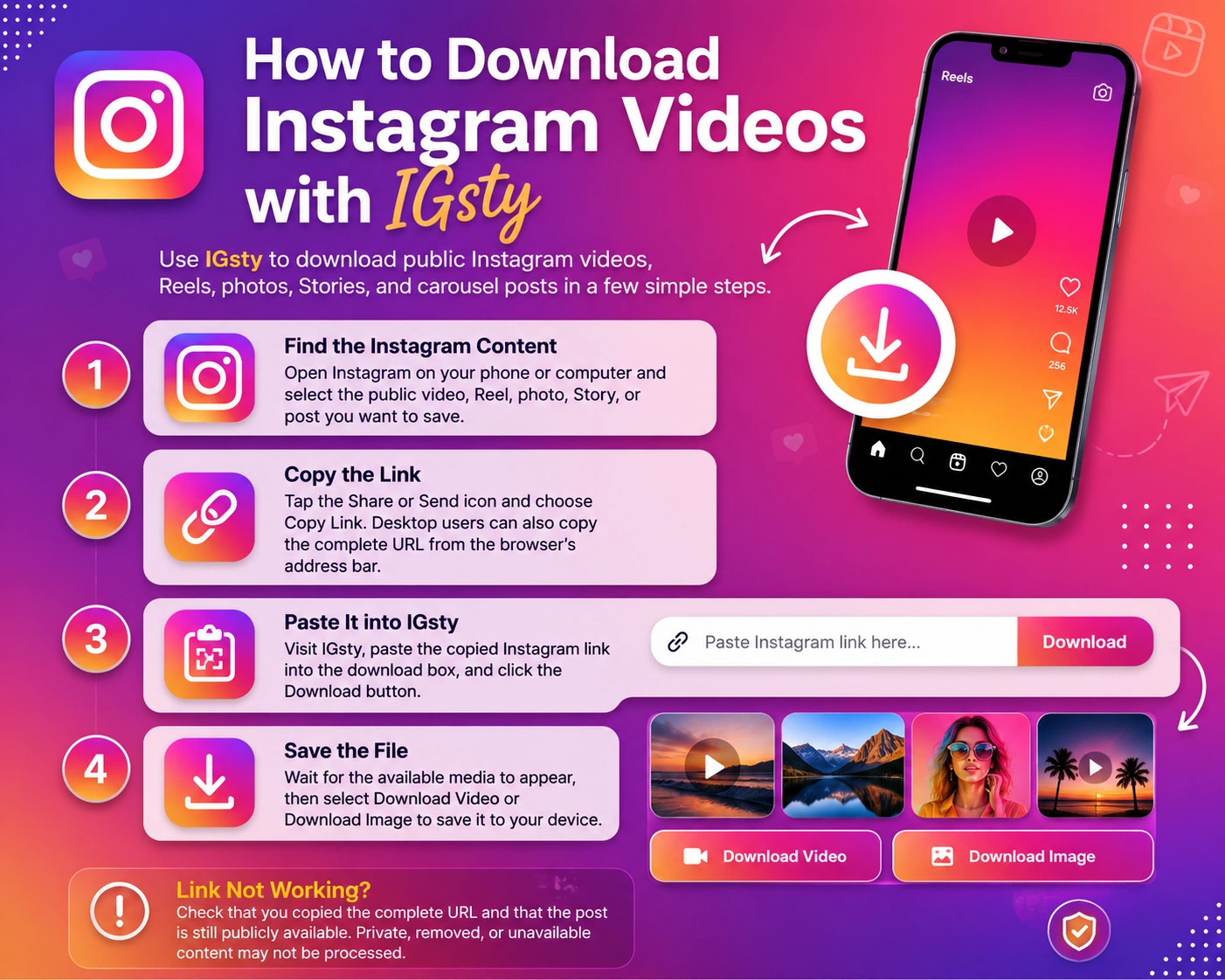
How to Download an Instagram Video with IGsty
The process is simple and does not require technical knowledge.
Find the Instagram Video
Open Instagram on your phone or computer. Find the video, Reel or public post you want to save. Make sure the content is still available and comes from a public account.
Private posts normally cannot be processed by a public link downloader. IGsty also states that private account content is not supported.
Copy the Post Link
Select the three-dot menu near the Instagram post.
Choose Copy Link. The exact location of this option may look slightly different depending on whether you are using Instagram on a phone or computer.
Open IGsty in Chrome
Open a new tab in Google Chrome and visit the IGsty website. You should see a field where you can paste the Instagram URL.
You should not need to provide your Instagram username or password. The IGsty website states that its downloader works without an Instagram login.
Paste the Link
Paste the copied Instagram link into the downloader box.
Check the link before continuing. It should point directly to the post, video or Reel rather than an Instagram profile or search page.
Start the Download
Select the download button and allow the tool to process the URL.
When the media appears, choose the available video, photo or download option. The file should then be saved in your normal Chrome Downloads folder unless you have selected a different location.
What Can You Download with IGsty?
You can paste the link to a public Instagram video and download the available file. The site says downloaded videos are provided in MP4 format.
IGsty provides a separate Reel downloader. The process is the same: copy the Reel link, paste it into the tool and select the download option.
The tool also supports individual Instagram images. This can be useful when saving your own product photo, design reference or personal post.
A carousel may contain several photos or a mixture of photos and videos. The downloader may show more than one file when the public post contains multiple items.
IGsty advertises support for publicly available Stories and Highlights. A Story must still be available or saved as a Highlight for the tool to find it.
Content shared only with Close Friends or through a private profile should not be expected to work.
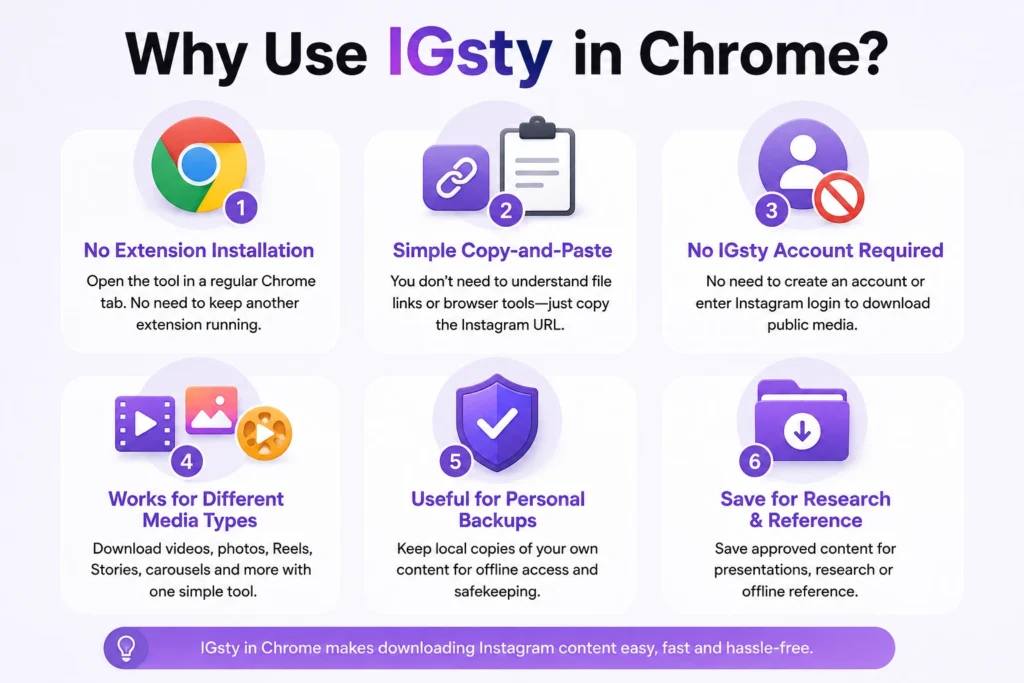
Why Use IGsty in Chrome?
No Extension Installation
Simple Copy-and-Paste Process
No IGsty Account Required
Works for Different Media Types
Useful for Personal Backups
Is IGsty Safe to Use?
No third-party website should be described as completely safe without an independent technical review.
IGsty states that users do not need to sign in and describes its downloads as secure. However, these are claims made by the website itself, not an independent security guarantee.
Use these basic safety checks:
Confirm that you are visiting the correct website.
Do not enter your Instagram password into a downloader.
Do not install unexpected software or browser files.
Avoid pages that ask you to enable suspicious notifications.
Check the downloaded file type before opening it.
Keep Chrome and your device security tools updated.
Close pop-ups that are unrelated to the requested download.
Is Downloading Instagram Videos Legal?
Downloading a file does not automatically give you ownership of it. The safest approach is to download only:
You should also respect the creator’s privacy. A public post is visible online, but that does not mean the creator has allowed everyone to reuse it.
Quick Tips for Better Downloads
Use the Direct Post Link
Copy the link from the actual video or Reel. A profile, hashtag or Explore page link may not work.
Check That the Account Is Public
Link-based downloaders generally cannot access private posts because the media is not publicly available.
Rename Important Files
A downloaded file may have a long or unclear name. Rename it with the creator, topic and date so you can find it later.
Example: my-travel-reel-july-2026.mp4
Keep the Creator’s Name
When saving another person’s content with permission, include their name in the filename or folder. This helps you remember where the content came from.
Do Not Download the Same File Repeatedly
Check your Downloads folder first. This prevents duplicate files from taking up storage space.
What to Do If IGsty Is Not Working
The Link Is Not Accepted
The Post Is Private
The Download Button Does Nothing
The Video Is Missing
The Downloaded Video Has Lower Quality
For the best copy of your own video, use the original file stored on your phone, camera or cloud account whenever possible.
IGsty Chrome Extension: Frequently Asked Questions
Final Thoughts:
IGsty offers a straightforward way to save supported public Instagram videos, Reels, photos and Stories through Google Chrome. Its biggest advantage is simplicity. You copy a public Instagram link, paste it into the tool and choose the available download option. There is no need to install a permanent browser IGsty Chrome Extension.
Still, convenience should not replace care. Never share your Instagram password with a downloader, check files before opening them and respect the copyright and privacy of every creator. For your own posts or content you have permission to save, IGsty can be a useful option for creating an offline copy without installing extra Chrome software.